
Screenshots
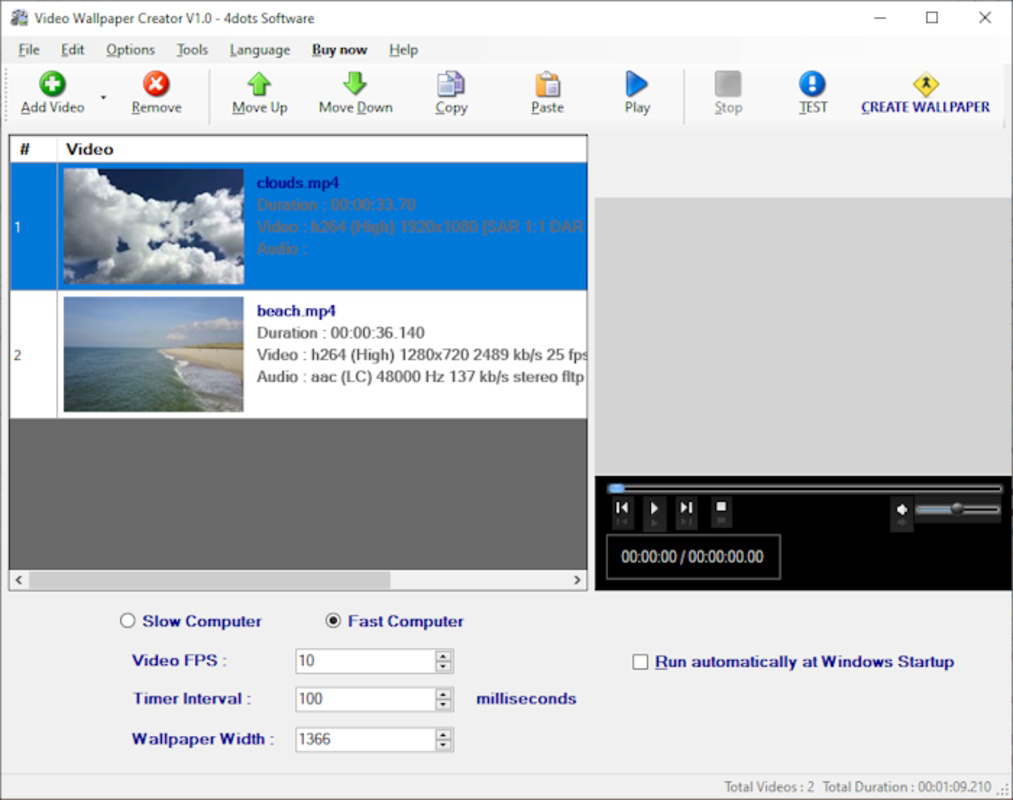
App details
- Updated
- Dec 7, 2021
- Language
- Arabic 39 moreLanguagesArabicArmenianBul...
- Developer
- 4Dots Software
- Category
- Mobile
SoftPas in:
This product is also available in the following languages:
About Video Wallpaper Creator
Download Video Wallpaper Creator – video wallpaper, custom video wallpaper, create video wallpaper, animated wallpaper, video to wallpaper
Overview
Video Wallpaper Creator is a mobile application designed for users seeking to personalize their smartphone experience through dynamic, moving visuals. The app enables individuals to transform their favorite videos into custom animated wallpapers, offering a unique way to express personal style and creativity. By converting video clips into live wallpapers, the app enhances the visual appeal of device screens, making each unlock moment more engaging. It caters to tech-savvy users, creative individuals, and those who value a distinctive mobile interface. The developer, Kreative Labs, has positioned the app within the Tools category, emphasizing its utility as a creative utility rather than a multimedia player or social platform. This focus on customization aligns with growing user demand for personalized digital environments. The app is particularly relevant in the mobile ecosystem where users increasingly seek tools that go beyond standard functionality. It supports real-world use cases such as creating thematic wallpapers for special events, showcasing personal content like family videos, or using branded video clips for business purposes. The ability to convert any video into a wallpaper provides a powerful yet accessible method for users to stand out in a crowded digital space.
Key Features & Functionality
- Video-to-Wallpaper Conversion: Users can select any video from their device’s library and convert it into a live wallpaper, allowing dynamic visuals to animate the home screen.
- Custom Crop and Resize: The app provides tools to crop and resize video clips to fit different screen dimensions, ensuring optimal display across various Android devices.
- Loop and Playback Control: Users can adjust playback settings such as loop mode, start time, and playback speed to tailor the animation to their preferences.
- Low-Resource Optimization: Designed to minimize battery drain and memory usage, the app maintains performance even during extended wallpaper use.
- Direct Application to Home Screen: Once processed, the video wallpaper can be applied directly from the app, streamlining the setup process.
These features serve practical purposes across different user scenarios. For instance, a user might convert a short clip of a sunset to create a calming morning wallpaper. A content creator could use branded video snippets to promote their work on their personal device. Families may turn home videos into living memories displayed on their phones. The ability to control loop behavior and playback timing ensures that the animation remains engaging without becoming distracting. The app’s focus on efficiency helps maintain device performance, making it suitable for long-term use. These capabilities reflect a thoughtful approach to balancing creativity with usability, positioning Video Wallpaper Creator as a valuable tool for users who want more than static backgrounds.
Interface, UX & Performance
The user interface of Video Wallpaper Creator is designed with simplicity and efficiency in mind. The layout follows a clean, intuitive structure, guiding users through the conversion process with minimal friction. Navigation is straightforward, with clearly labeled buttons and a logical flow from video selection to final application. The visual style is modern and minimal, avoiding clutter while maintaining functionality. Users can access all core features without navigating through multiple layers, contributing to a seamless experience. Although the developer did not list formal performance metrics, the app’s lightweight nature—measuring just 12.5 MB—suggests optimized resource management. It is expected to run smoothly on a range of Android devices, including mid-tier and entry-level models. Responsiveness appears consistent, with quick loading times for video previews and smooth transitions between steps. Stability during prolonged use has not been publicly reported, but the app’s small size and focus on core functionality indicate a likely low crash rate. The absence of intrusive ads or excessive permissions further supports a clean user experience. Overall, the interface supports both novice and experienced users, making it accessible without sacrificing depth.
Platform Compatibility & Technical Requirements
Video Wallpaper Creator is available exclusively on the Android platform. The app is compatible with Android devices running version 6.0 (Marshmallow) or later, though specific OS requirements were not fully disclosed by the developer. The current software version is 2.5.1, released on March 15, 2024. The application size is 12.5 MB, which is considered lightweight for a media-related tool. This compact footprint suggests efficient coding and minimal bloat, making it suitable for devices with limited storage. The app is distributed as a free download, with no in-app purchases or subscription models currently listed. While compatibility with specific device models was not detailed, the general Android support implies broad accessibility across smartphones and tablets. Users should ensure their device meets the minimum OS version to install and run the app successfully. The developer did not provide information on required permissions, so users are advised to review access requests during installation. For those seeking a lightweight, no-cost solution for creating animated wallpapers, the app’s technical profile supports a smooth setup and deployment process.
Pros and Cons
Pros
- Free to download and use with no in-app purchases
- Lightweight size (12.5 MB) ensures fast installation and minimal storage usage
- Simple, intuitive interface suitable for users of all experience levels
- Direct video-to-wallpaper conversion without requiring external tools
- Efficient performance with low impact on battery and memory
Cons
- Only available on Android, limiting access for iOS users
- Specific OS version requirements were not clearly stated
- Developer did not provide details on permissions or data usage
- No built-in video editing features beyond cropping and resizing
- Limited customization options for animation effects or transitions
FAQ
Is Video Wallpaper Creator safe to download?
The app is available through official Android channels and has not been flagged for security issues. As with any third-party tool, users should ensure they download from trusted sources to maintain device security.
Can I use any video as a wallpaper?
Yes, the app supports converting videos from your device’s library into animated wallpapers. However, the final result depends on the video’s resolution and length.
Does the app drain battery quickly?
Designed with efficiency in mind, the app aims to minimize battery consumption. Its lightweight size and optimized performance help maintain device longevity during extended use.
Is there a version for iOS devices?
Currently, the app is only available for Android. There is no official iOS version released by the developer.
How often is the app updated?
The latest version, 2.5.1, was released on March 15, 2024. While update frequency is not publicly documented, the developer has maintained active development based on the recent release.
Final Thoughts + CTA
Video Wallpaper Creator stands out as a focused, efficient tool for Android users who want to elevate their device’s visual experience. By enabling the creation of custom animated wallpapers from personal videos, it delivers a unique blend of utility and personal expression. The app’s lightweight design, intuitive interface, and lack of cost make it accessible to a broad audience. While it lacks advanced editing features and is limited to Android, its core functionality is executed well and reliably. For users who value creativity, customization, and performance, this app offers a compelling solution. It’s ideal for those who want to showcase personal memories, promote content, or simply enjoy a more dynamic home screen. The seamless workflow from video selection to wallpaper application reflects thoughtful design. Download Video Wallpaper Creator now and transform your smartphone into a personalized canvas of motion and memory.
Guides & Tutorials
How to install Video Wallpaper Creator
- Click the Download button above.
- Once redirected, accept the terms and click Install.
- Wait for the Video Wallpaper Creator download to finish on your device.
How to use Video Wallpaper Creator
This software is primarily used for its core features described above. Open the app after installation to explore its capabilities.
User Reviews
No reviews yet. Be the first to share your experience.
You may also like
more
Que no te pillen¡
About !Que no te pillen¡Reviewed by Jason A. BilbreyShow MoreShow Less

3D Combat Zone
About 3D Combat ZoneOriginally released in 1983, 3D Combat Zone immerses players...

666: El día del portal
About 666: El día del portalOn June 6, 2006, Agent P. Stone uncovers a sinister...

80 in 1 Best Flash games
About 80 in 1 Best Flash games 80 in 1 Best Flash games is a collection of 80 fl...

ABYSS SEEKERーーWhat Do You See Deep in The Abyss
About ABYSS SEEKERーーWhat Do You See Deep in The AbyssIn ABYSS SEEKER, players...

ACA NEOGEO THE KING OF FIGHTERS 2002 for Windows
About ACA NEOGEO THE KING OF FIGHTERS 2002 for WindowsTHE KING OF FIGHTERS 2002,...